How to Update a Web Page Without Losing the SEO Rankings You've Already Earned
A developer-focused workflow for updating live pages: branch, edit, run SEO checks, open a PR, deploy, and verify the crawl handoff in Search Console.
You update a pricing page in the CMS, change a heading, replace an outdated screenshot, and publish. A week later, the page has lost its internal links, the canonical points at the wrong URL, and the title shown in Google still reflects the old metadata. Nobody can tell which change caused the problem because there's no diff, review record, or rollback path.
That's the failure mode this guide walks through: how to update web page content without losing the rankings it already has.
For a bootstrapped SaaS team, a web page SEO update should look like a small software release. Start with a page worth changing, create a controlled branch or staging copy, edit the content and metadata, run SEO checks, open a pull request, deploy, and verify the crawl handoff in Google Search Console. This takes more discipline than editing live content, but it gives developers a clear review surface and protects the search equity the page has already earned. That's what a disciplined website content update looks like in practice.
Why Updating a Page Beats Publishing a New One
A page that already ranks has history attached to its URL. It may have backlinks, internal links, impressions, clicks, and query associations that a new page doesn't have. If the existing page still matches the topic, improving that URL is usually safer than creating a competing page and splitting relevance across two addresses.
The strongest evidence comes from a content-refresh study covering 15,000 URLs. Pages that received 31% to 100% more content showed a statistically significant average ranking improvement of +5.45 positions, while pages that weren't updated declined by 2.51 positions. The study reports p=0.026, so the observed difference was unlikely to be random. Read the content-refresh study details to see why substantial expansion matters more than cosmetic edits.
That doesn't mean adding paragraphs for their own sake. A useful refresh expands coverage, answers additional intent variants, replaces obsolete information, and makes the page easier to use. Changing a sentence or publishing a new date without improving the answer won't fix a page that misses the questions searchers ask.
Practical rule: Keep the URL when the page's core intent is still correct. Create a new page when the search intent, audience, or job to be done is materially different.
The web also gives active teams an opening. Independent website research estimates about 1.98 billion websites registered globally in 2026, with roughly 400 million actively maintained and serving unique content, while around 250,000 new websites are created daily. The same research places average website lifespan at 2 years and 7 months. The website-count research describes a crowded web where many sites aren't maintained consistently.
For a small SaaS team, the implication is operational. Don't treat a refresh as a note in an SEO spreadsheet. Treat it as a reviewed change that expands the answer, preserves the URL, and ends with a deployment and recrawl check.
Decide What to Update First and When
Start with a queue, not a blank document. Export your pages from a crawler or content inventory and include the URL, last modified date, word count, organic sessions, clicks, impressions, primary query, and current conversion path. Then sort for pages where the business value is clear and the work is bounded.
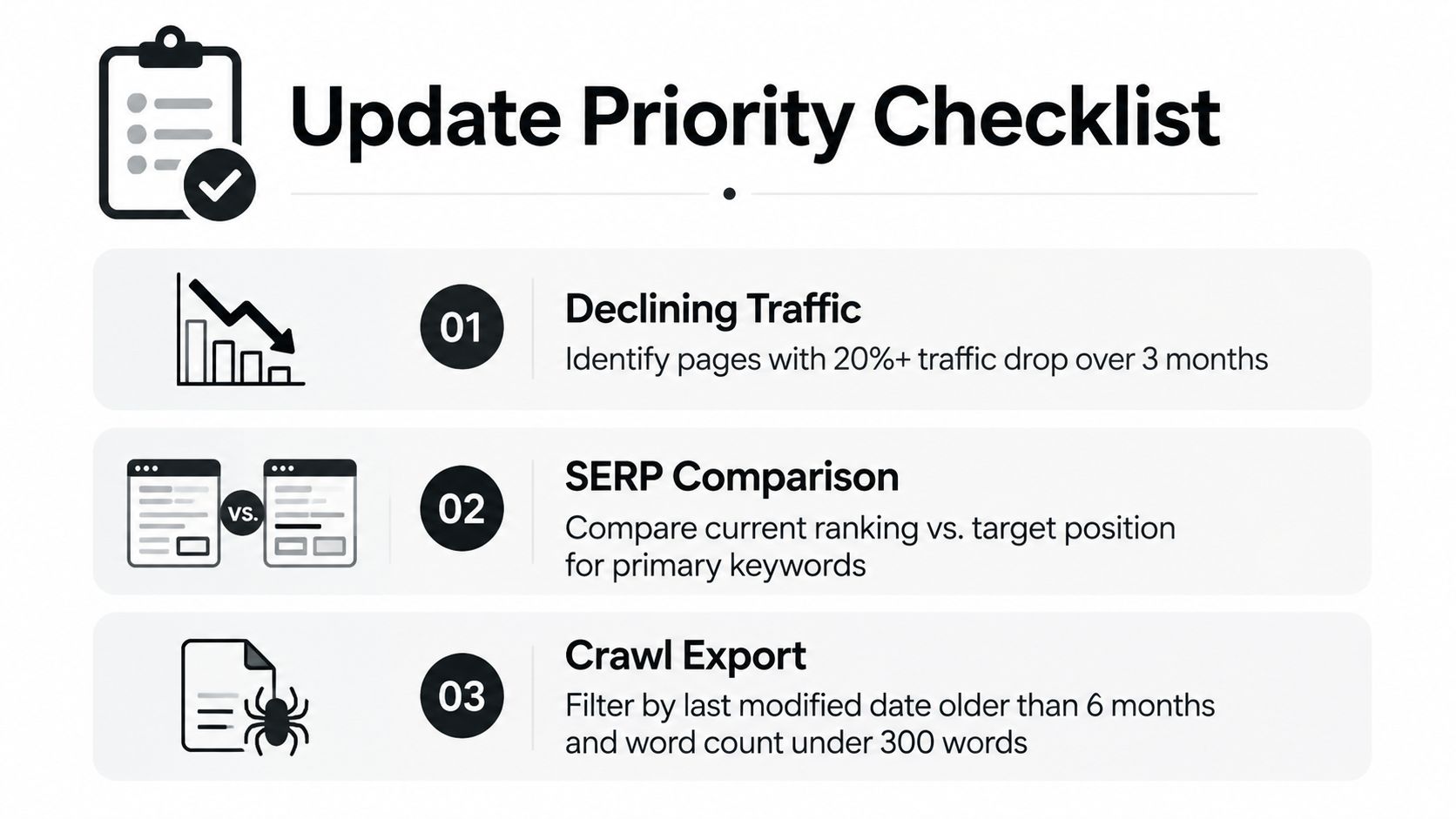
Build the shortlist
Use three signals together:
- Declining performance: Find pages losing clicks or impressions over time. A decline matters more when the page targets a commercial query, links to a product flow, or previously generated qualified demand.
- SERP mismatch: Search the primary query in a clean browser and compare the current top results with your page. Record missing sections, formats, definitions, examples, and FAQs. Don't copy competitors. Identify the unanswered part of the query.
- Stale implementation: Filter the crawl export by old last-modified dates, short content, broken links, obsolete screenshots, and examples tied to discontinued product behavior.
Recent content-refresh guidance recommends reviewing evergreen pages every 6 to 12 months, competitive topics every 3 to 6 months, and fast-changing topics every 1 to 3 months. The update-cadence guidance also recommends refreshing title years where relevant and maintaining an accurate last-modified date.
| Signal | High Priority Example | Lower Priority Example |
|---|---|---|
| Declining traffic | A product comparison page is losing qualified search visibility and its competitors cover newer alternatives | A low-value announcement page has stable branded traffic |
| SERP mismatch | The results answer setup questions your page never addresses | Your page already matches the dominant format and intent |
| Stale content | Screenshots show an old interface and links return errors | The interface, examples, and references still match production |
| Business value | The page supports a signup, demo, or high-intent product path | The page has no meaningful connection to your current offer |
A useful prioritization rule is impact divided by effort. Put pages with clear commercial relevance, visible SERP gaps, and manageable edits at the top. Defer pages that need a complete repositioning, a new information architecture, or product decisions the team hasn't made yet.
Don't confuse a newer timestamp with a better page. Mark the page as updated only after changing the substance, then update the visible date and metadata consistently. The date should help users understand recency, not disguise an unchanged article.
Prepare a Safe Edit Workflow Before You Touch Content
The safest update starts before anyone edits copy. Create a branch or staging record that represents the current production page, and make the original read-only during the review window if your CMS supports that control.
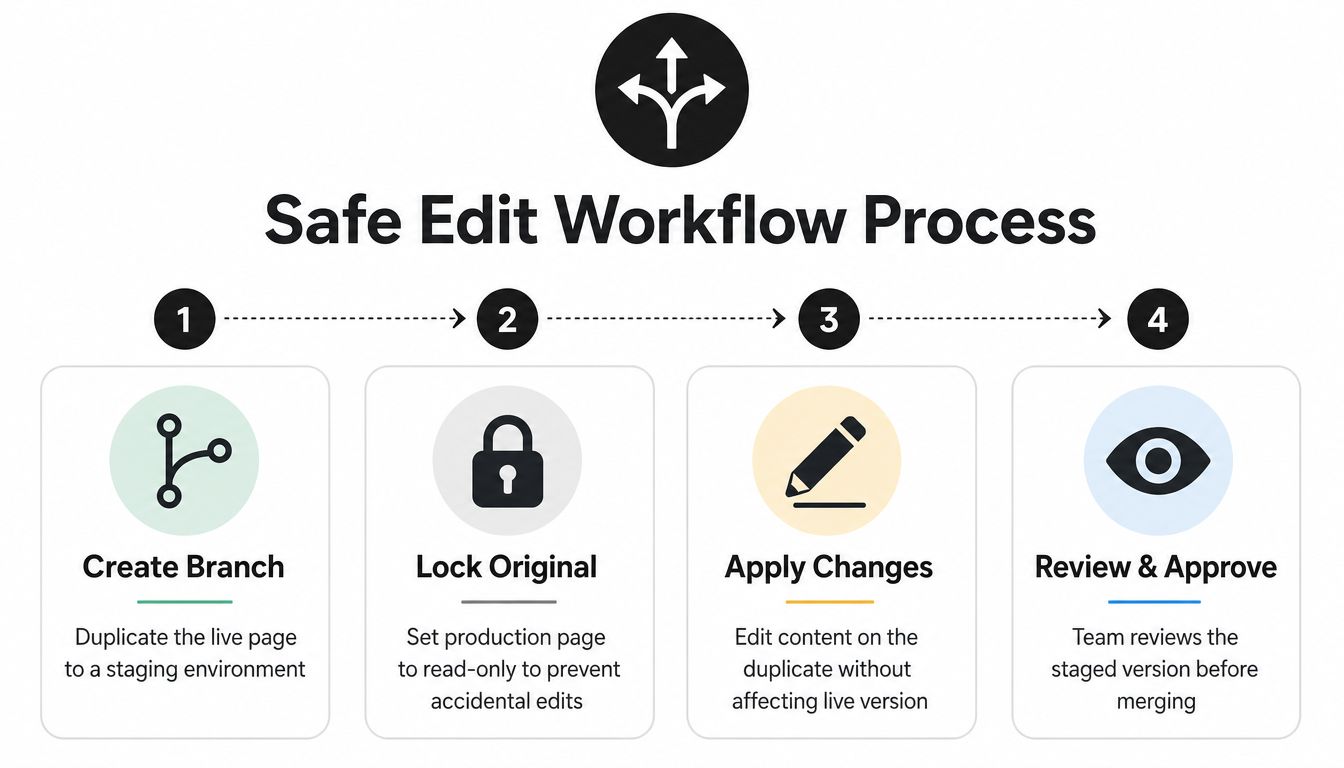
Create a reviewable change
For a code-managed site, a practical sequence looks like this:
- Create the branch: Use a name such as
content/update-page-slugand copy the current page content into the relevant source file, often a Markdown, MDX, JSON, or template file. - Record the baseline: Save the current title, description, canonical URL, headings, links, image paths, and structured data before editing. Capture the page's current Search Console queries if you need a comparison later.
- Edit the duplicate: Change the content in staging, not production. Replace images in the repository, update alt text, and check that the new asset path resolves in the built site.
- Open a pull request: Explain what changed, why it changed, which URL remains stable, and what checks passed. A reviewer should understand the risk without opening a separate SEO document.
A CMS-only team can use the same model by exporting the page, duplicating it into staging, and attaching the change log to the publishing ticket. The technology differs, but the control is the same: one original, one proposed version, one approval record.
Keep edits narrow enough to review. If you're expanding an article, don't simultaneously redesign the navigation, rename the URL, replace the analytics implementation, and change the template unless those changes are required. A clean diff makes regressions easier to isolate and reversions safer.
SEO experimentation is useful when you want to separate controlled content changes from unrelated site changes and preserve a record of what shipped.
What belongs in the pull request
Include the old and new title, the target query and intent, changed sections, replaced assets, internal links added or removed, metadata changes, and the validation commands or preview checks used. If the page is in a CMS, attach before and after screenshots and the staging URL.
Tools such as Orchory can produce a ready-to-run handoff for a coding agent without direct site access. The developer still reviews the diff, runs the checks, and merges the PR. That separation keeps production control with the team.
Run SEO Checks That Protect Rankings During Updates
The staged page needs a search review, not just a grammar pass. Start by comparing the live SERP with the proposed page. Searchers may expect a tutorial, comparison, template, definition, or product page, and a refresh can accidentally push the document away from the format that made it relevant.
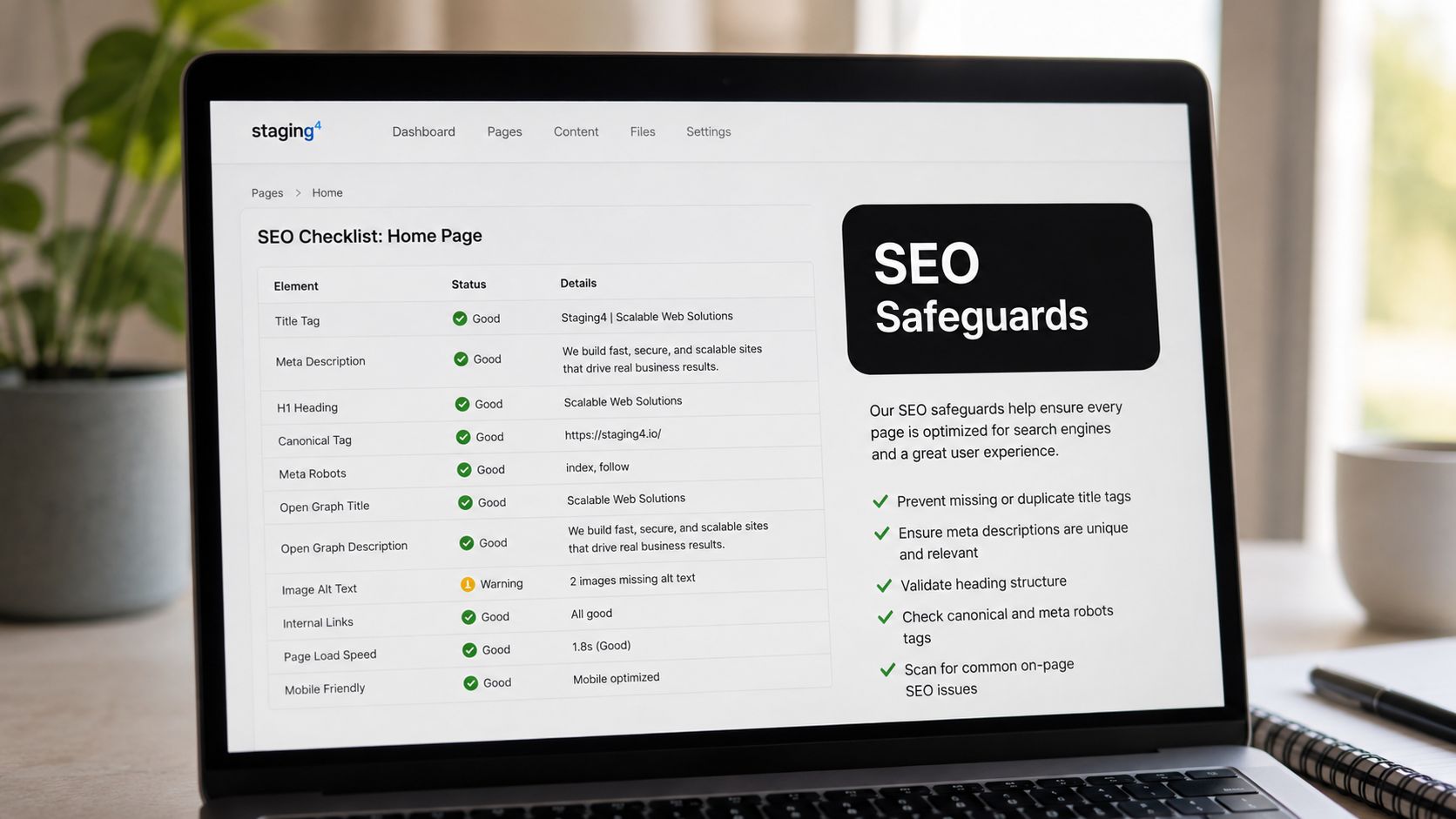
Preserve the page's identity
Check these fields in the PR:
- Intent and scope: The opening answer should remain focused on the primary problem. Add related questions only when they support that problem.
- Title and metadata: Compare the visible H1, HTML
<title>, meta description, andog:title. Google can useog:titlewhen generating title links, so changing the H1 alone may not change what users see in search. Google's title-link documentation recommends regularly updating content and titles when trying to influence title links. - Headings: Keep one clear page topic, use headings to expose the information hierarchy, and check that the new sections don't create duplicate or empty heading levels.
- Canonical and URL: Keep the canonical pointed at the intended stable URL. Don't change the slug merely because the page was refreshed.
- Internal links: Add links from relevant pages and preserve useful links already receiving traffic. Remove links only when their destinations no longer exist or the relationship is no longer accurate.
- Facts and examples: Verify every statistic, product detail, and external reference against a current primary source before merge.
The expansion should answer more variants without turning into a collection of loosely related keywords. A keyword research workflow can help organize related terms, but the developer still has to judge whether each proposed section belongs on this URL. Orchory AI Keyword Research Tool can be included in that planning process as one available research option.
Inspect the rendered output
Review the built page, not only the source file. Confirm that the updated content appears in the HTML, images have dimensions and descriptive alt text, links point to the intended destinations, and mobile layout doesn't hide the new answer. Check the page's structured data only if the template uses it, and remove fields that no longer describe the content.
SEO guidance for developers can help developers keep these checks inside the normal implementation workflow rather than handing an unreviewed content document to engineering.
The final PR should answer a simple question: did the page become more useful without changing the URL's search identity? If the answer is unclear, the edit needs a narrower scope or better evidence.
Test Deploy and Get the Update Indexed
Getting staging and deployment right catches content and rendering defects, but it doesn't prove the production URL serves the intended version. Before merging, test every changed link, image, heading, form, and responsive state. Confirm that staging isn't accidentally indexable, and verify that the production build will retain the page's canonical and sitemap entry.
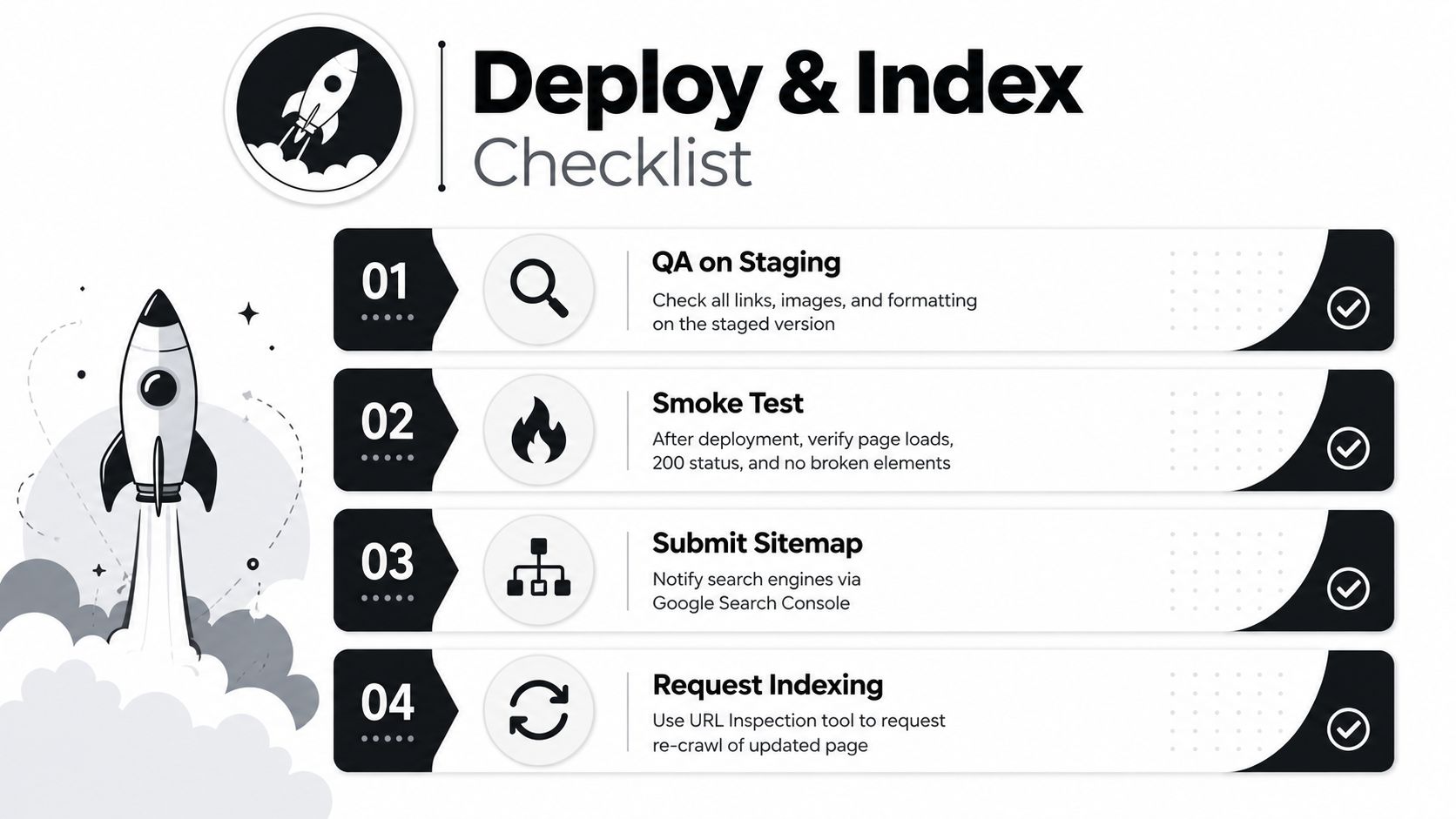
Use a short deployment sequence
- Run a QA checklist: Open the page as a user. Test navigation, images, forms, code examples, and links. Check the source for the expected title, canonical, and updated content.
- Merge and deploy: Merge the approved PR through the normal production pipeline. Avoid making a second manual CMS edit after approval because it breaks the reviewed state.
- Smoke-test production: Open the exact URL, confirm it loads successfully, check the visible changes, inspect the rendered source, and verify that no template or asset regression appeared.
- Submit the sitemap: Google recommends submitting sitemaps and requesting recrawls to help new or updated pages get found. Google's developer guidance covers that discovery handoff.
- Request a crawl: In Search Console, open URL Inspection for the production URL and select the request option. The URL must belong to the currently opened property, and the requester must be an owner or full user. Google's recrawl instructions document these access requirements.
Google Search Console's URL Inspection tool exposes information from Google's index, including the last crawl date, indexing or crawl errors, and the canonical URL for the inspected page. The Search Console overview explains the inspection workflow.
<iframe width="100%" style="aspect-ratio: 16 / 9;" src="https://www.youtube.com/embed/JVVtMccRf9s" frameborder="0" allow="autoplay; encrypted-media" allowfullscreen></iframe>Don't treat a recrawl request as proof of ranking or indexing. Record the deployment commit, update date, target query, and baseline Search Console view. Then compare clicks, impressions, queries, and page-level behavior after the crawler has had time to process the change. If the canonical is wrong, the content isn't present in the rendered HTML, or the URL returns an error, fix the deployment before interpreting performance.
A Repeatable Checklist for Future Page Updates
A page refresh becomes manageable when every update follows the same path:
- Triage the queue: Select pages with declining visibility, a clear SERP gap, stale assets, or meaningful business value.
- Define the change: Write the target intent, sections to add, facts to verify, links to preserve, and success signals.
- Create a safe copy: Branch the page or duplicate it in staging. Keep production untouched while the proposal is reviewed.
- Edit for usefulness: Expand the answer, replace obsolete examples and screenshots, repair links, and keep the existing URL when intent remains stable.
- Run the SEO diff: Check title,
og:title, H1, headings, canonical, internal links, images, structured data, and rendered HTML. - Review and merge: Open a PR or equivalent approval record. Include the before and after state and the reason for each material change.
- Deploy and smoke-test: Verify the production URL, content, assets, status, canonical, and sitemap.
- Hand off to Google: Submit the sitemap and request a recrawl through URL Inspection when appropriate.
- Measure the result: Keep the commit, update date, target query, and Search Console comparison attached to the page record.
The process works because it separates selection, editing, release control, and measurement. You don't need a full-time SEO specialist to run it. You need a queue, a reviewer, a stable URL policy, and enough documentation to know what changed.
Use small, meaningful updates instead of waiting for a large rewrite. The page should earn its new date through a real improvement, and the next candidate should already be waiting in the queue.
Orchory helps teams turn SEO research into a prioritized page-opportunity queue and ready-to-run prompts for coding agents that can open pull requests. Visit Orchory to plan the next page update without giving an agent direct production access.
FAQs
Should I update an existing page or publish a new one?
How often should evergreen and competitive pages be refreshed?
How do I safely edit a live page without breaking its SEO?
What SEO fields should be checked before merging a page update?
How do I get Google to recrawl an updated page?